What Are Offsets?
Memory offsets can simply be described as memory addresses that represent the relative location of specific data within a game.
Why Offsets?
Offsets might sound complicated, but they’re actually a simple way to find information in a game’s memory. Instead of searching randomly, offsets give you a reliable path to find player health, position, or other game details, even when the game restarts.
The biggest problem you’d have with offsets is when the game gets updated. When the game code changes, (most likely) so do offsets. That means you’d have to find the offsets all over again, and this becomes a hassle when the game gets regularly updated.
The Problem
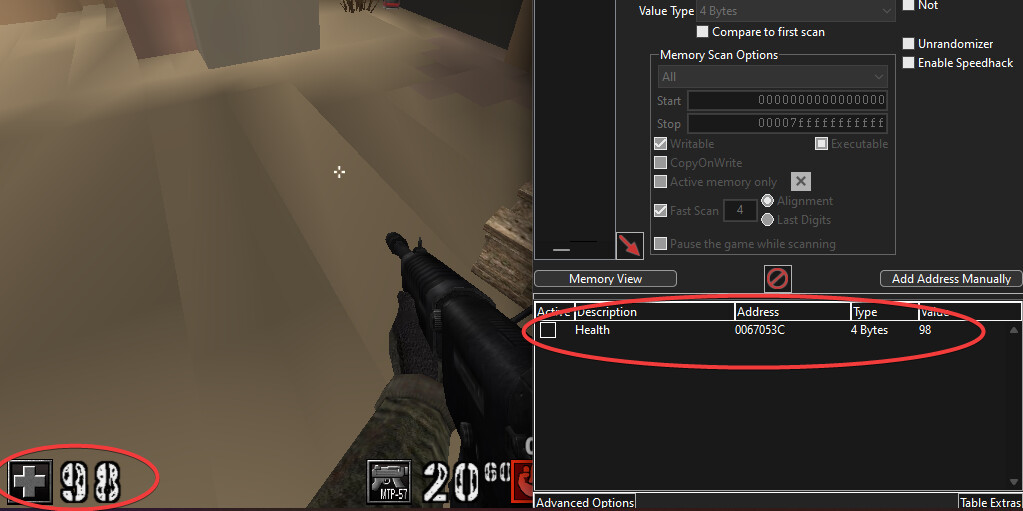
We found the current health address, but look what happens when we close and reopen the game.
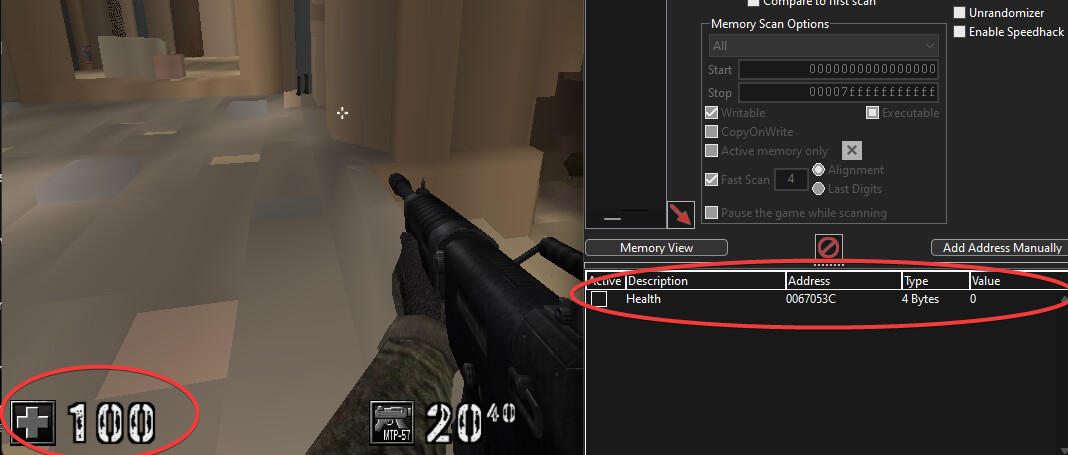
The health address we previously found says our health value 0? But our health is currently 100?
Why Addresses Change
Addresses change because games use dynamic memory allocation. Each time you launch your game, it randomizes memory locations. This is why direct address tracking becomes unreliable. Reading just from a health address you found in Cheat Engine isn’t reliable. This is where offset finding becomes comes into play.
The Solution
We can solve this problem using pointer chaining. Instead of tracking a single, fixed memory address, we can create a method to navigate to the correct memory location using a base pointer and a series of consistent offsets.
Example
Game Base Address (0x10000)
│
├── Player List (0x100)
│   ├── Player 1 Offset     (0x00)
│   │   ├── Health Offset   (0x10)         // Value: 100
│   │   ├── Position Offset (0x20)
│   │   │   ├── X Offset    (0x00)         // Value: 10.5
│   │   │   ├── Y Offset    (0x04)         // Value: 20.3
│   │   │   └── Z Offset    (0x08)         // Value: 5.7
│   │   └── Weapon Offset   (0x30)         // Value: Sword
│   │
│   ├── Player 2 Offset     (0x50)
│   │   ├── Health Offset   (0x10)         // Value: 75
│   │   ├── Position Offset (0x20)
│   │   │   ├── X Offset    (0x00)         // Value: 15.2
│   │   │   ├── Y Offset    (0x04)         // Value: 18.6
│   │   │   └── Z Offset    (0x08)         // Value: 6.1
│   │   └── Weapon Offset   (0x30)         // Value: Pistol
│   │
│   └── Player 3 Offset     (0xA0)
│       ├── etc
If you’d want to go to a specific value, all you have to do is calculate it. For example, if you’d want to find Player 1’s health, all you’d have to do is calculate:
Base Address + Player List + Player 1 + Health
Which, in turn, would be: 0x10000 + 0x100 + 0x00 + 0x10, giving us the memory address of 0x10110. The memory address we just calculated is where Player 1’s health is stored. This is where you want to read from in your program if you’re looking for Player 1’s health.
If we’d want to find Player 2’s X position we’d have to calculate Base Address + Player List + Player 2 + Position Offset + X Offset
This would become: 0x10000 + 0x100 + 0x50 + 0x20 + 0x00, meaning the memory address we want to find is 0x10170. The memory address we just calculated is where Player 2’s X position is stored. This is where you want to read from in your program if you’re looking to read their position.
Putting it all together
DWORD GetProcessIdByName(const wchar_t* processName) {
        PROCESSENTRY32 processInfo;
        processInfo.dwSize = sizeof(processInfo);

        HANDLE snapshot = CreateToolhelp32Snapshot(TH32CS_SNAPPROCESS, 0);
        if (snapshot == INVALID_HANDLE_VALUE) {
            return 0;
        }

        Process32First(snapshot, &processInfo);
        do {
            if (wcscmp(processInfo.szExeFile, processName) == 0) {
                CloseHandle(snapshot);
                return processInfo.th32ProcessID;
            }
        } while (Process32Next(snapshot, &processInfo));

        CloseHandle(snapshot);
        return 0;
    }

    DWORD_PTR GetModuleBaseAddress(const wchar_t* moduleName) {
        MODULEENTRY32 moduleInfo;
        moduleInfo.dwSize = sizeof(moduleInfo);

        HANDLE snapshot = CreateToolhelp32Snapshot(TH32CS_SNAPMODULE | TH32CS_SNAPMODULE32, processId);
        if (snapshot == INVALID_HANDLE_VALUE) {
            return 0;
        }

        if (Module32First(snapshot, &moduleInfo)) {
            do {
                if (wcscmp(moduleInfo.szModule, moduleName) == 0) {
                    CloseHandle(snapshot);
                    return reinterpret_cast<DWORD_PTR>(moduleInfo.modBaseAddr);
                }
            } while (Module32Next(snapshot, &moduleInfo));
        }

        CloseHandle(snapshot);
        return 0;
    }

// Once you have the base address you can just add the offsets you have found
// Next tutorial we'll learn how to actually find offsets
